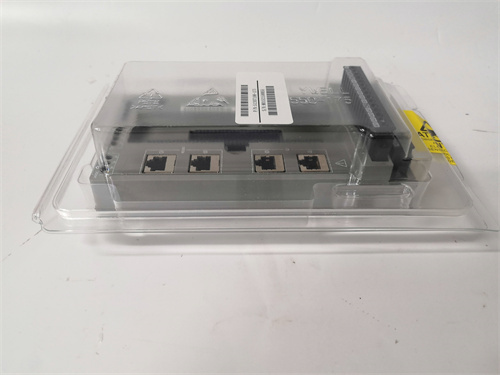
SC-UCMX01 Honeywell | Universal Control Network Module, In Stock
$ 91.48

Description Key Technical Specifications Parameter Specification Model Number SC-UCMX01 Order Code 51307198-175 Network Type Universal Control Network (UCN) Data Rate 5 Mbps Protocol Honeywell proprietary UCN Redundancy Supports redundant pair operation (primary/secondary) Cable Type 75Ω coaxial (RG-11/U or equivalent) Connection BNC female (2 ports – A and B) Distance per segment Up to 2000 meters (with proper cable) Nodes per segment Up to 32 devices Power Supply 5V, 24V from UCN rack backplane Power Consumption 8W typical Indicators Power, Active, Fault, A/B port status Diagnostics Self-test on power-up, continuous link monitoring Operating Temp 0°C to 60°C Mounting UCN I/O rack (single slot) Product Introduction Your TDC 3000 system shows a “UCN Comm Fail” alarm, and suddenly half the plant’s I/O disappears from the operator screens. The HONEYWELL SC-UCMX01 51307198-175 is the communication module that sits in the UCN rack, talking to the NIM (Network Interface Module) over that 75Ω coax. It’s the gateway between the I/O modules—analog inputs, digital outputs, smart transmitters—and the rest of the DCS. No UCMX01, no data. Simple as that. The SC-UCMX01 runs at 5 Mbps, which sounds slow compared to modern Ethernet, but for process data it’s plenty. A full rack of I/O updates every 50-100 ms. The module supports redundancy: two UCMX01s in the same rack, one primary, one secondary. When the primary fails, the secondary takes over without dropping I/O. You’ll see the “ACTIVE” LED swap. That handoff takes about 200 ms—some loops may bump, most won’t notice. The 51307198-175 is the specific order code; other variants (like -150) have different firmware or coax driver characteristics. Match your existing part number exactly. Installation & Configuration Guide Phase 1: Pre-Installation Identify the UCN segment and rack location. The SC-UCMX01 occupies a specific slot in the UCN rack—usually slot 0 or 1, but verify with your cabinet drawings. Tag out the 24V DC supply to the rack if possible. For redundant pairs, you can swap one module while the other carries traffic—but field power to the rack must stay live for the I/O modules. Have a BNC crimp tool and proper coax connectors ready if you’re re-terminating cable. Phase 2: Removal (if replacing existing) If the module is part of a redundant pair and the other is active, you can remove the failed unit without shutting down the rack. Pull it straight out—captive screws first. If it’s a single (non-redundant) configuration, removing it kills communication to all I/O in that rack. Schedule downtime. Disconnect the BNC cables from ports A and B. Label them—crossing A and B doesn’t matter for single, but for redundant networks the cabling topology is critical. Phase 3: Installation Inspect backplane pins. Bent pins are common. Slide the new HONEYWELL SC-UCMX01 into the slot until seated. Tighten captive screws finger-tight plus quarter turn. Reconnect BNC cables—A to A, B to B. If you’re installing a redundant pair, set the DIP switches on each module to designate primary and secondary (usually switch 1 on, switch 2 off for primary; opposite for secondary). Verify termination resistors—ends of UCN segments require 75Ω terminators on unused BNC ports. Phase 4: Power-On & Testing Apply power to the rack. Observe the module LEDs: Power on green, then Self-test flashes, then Active solid green on the primary (or secondary if primary fails). Fault LED should be off. If Fault LED is red, the module sees a communication problem—check BNC connections, termination, and verify the NIM on the other end is communicating. Connect to the NIM engineering station. Poll the UCN rack. All I/O modules should report healthy. If the rack doesn’t appear, check the UCMX01 node address—it’s set via DIP switches or software, depending on revision. Verify it matches the NIM’s address table. Frequently Asked Questions (FAQ) Q: What’s the difference between SC-UCMX01 and SC-UCMX02? The SC-UCMX02 is an enhanced version with additional diagnostic features and support for longer cable segments. Electrically, they’re interchangeable on the UCN network. The SC-UCMX01 is the earlier version. If your system has a mix, they’ll work together, but you may get “mismatch” warnings in the NIM diagnostics. Stick with matching types for simplicity. Q: Can I use this module on a UCN segment with both copper and fiber? No—the SC-UCMX01 is strictly copper (coax). For fiber segments, you need the SC-UCMX02-F or separate fiber optic converters (like the 51307081-100). The UCN supports mixed media via repeaters, but the module itself is one or the other. Q: The module powers up but Fault LED is red. What’s wrong? Red Fault means the module isn’t communicating on the UCN. Check: BNC cables properly connected and tight 75Ω terminators installed at segment ends NIM on the other end is powered and communicating No duplicate node addresses on the segment Coax cable not shorted or open (use a TDR if available) Q: Can I hot-swap this module in a redundant pair? Yes—that’s the point of redundancy. The secondary takes over. Pull the primary, replace it, it will re-sync and become standby. No process interruption. But if it’s the only module on the segment (non-redundant), pulling it drops all I/O in that rack. Don’t do that live. Q: The Active LED is flashing instead of solid. What does that mean? Flashing Active indicates the module is in “standby” mode in a redundant pair—it’s ready to take over but the primary is active. Solid Active means it’s the primary. If you have two modules and both show flashing Active, neither thinks it’s primary—check DIP switch settings. If both show solid Active, you have two primaries fighting—causes network collisions and intermittent data. Q: What’s the maximum number of UCMX01 modules on one UCN segment? Up to 32 nodes total per segment, including NIMs, UCMs, and other UCN devices. Electrical loading limits it. Beyond that, you need repeaters or fiber segments. Q: The module gets warm—too warm? Normal. The SC-UCMX01 draws about 8W, most of it dissipated as heat. The coax drivers run warm. If it’s too hot to touch (>60°C), check rack airflow. If the rack fan failed, address that first—otherwise the module will eventually fail from heat stress. Q: Is the 51307198-175 the only valid order code? For the SC-UCMX01, yes. But there are other UCM variants with different order codes (e.g., -150 for different coax impedance). The -175 is the standard 75Ω version. Verify your existing module’s order code before ordering. If you have a -150, the -175 may not work—impedance mismatch causes signal reflections and data errors. EMERSON 5A26355G04 PLC EMERSON 5A26355G05 PLC EMERSON 5A26355G06 5A26355G07 EMERSON 5A26355G08 EMERSON Email: [email protected] Phone: 86 15340683922 Sales:Wu Jiedong Our products are guaranteed for 1 year, with new and original production stopped and imported spare parts. All prices listed on the official website are subject to confirmation by contact: Wu Jiedong (manager). Our product: brand new original packaging Our warranty: All new or repaired parts have a 12 month warranty period beginning Our payment: 100% telegraphic transfer of inventory items before shipment, conditions can be proposed! If you have any downtime spare parts that you cannot find, please feel free to call or use email to contact me. If there are issues that the product cannot solve, please contact me. Product prices can be negotiated. Please do not consider contacting me!